Feb. 04, 2026
While 10.1-inch 16:9 and 16:10 touchscreens have the same diagonal size, they differ significantly in several aspects. Here's a detailed comparison:
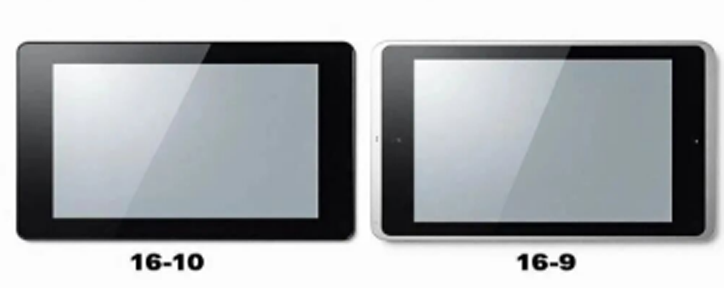
1. Core Difference: Screen Shape and Size
This is the most fundamental difference. Screen size refers to diagonal length, but the aspect ratio determines the screen's "shape."
* 10.1-inch 16:9: This is a wider, flatter "widescreen" shape. It's wider and shorter along the same diagonal. Its dimensions are approximately 222mm
(width) × 125mm (height).
* 10.1-inch 16:10: In contrast, it's more "square," slightly narrower but taller. Its dimensions are approximately 216mm (width) × 135mm (height).
Simply put, a 16:10 screen is about 1 cm taller and less than 1 cm narrower than a 16:9 screen.
2. Display Effect and Application Experience
Different shapes directly determine different visual and user experiences.
* **Vertical Display Space (Core Advantage):**
* The biggest advantage of a 16:10 screen lies in its additional vertical pixels. When processing documents, browsing the web, editing code, or reading
ebooks, a 16:10 screen can display more lines of content at once, reducing the frequency of scrolling and significantly improving information density
and work/reading efficiency.
* A 16:9 screen is relatively cramped in vertical display and is more suitable for content that is primarily horizontal.
* **Audio-Visual Entertainment Compatibility:**
* 16:9 is the current standard format for high-definition video (1080P, 720P) and mainstream online streaming media. When watching movies and videos
on a 16:9 screen, the screen can completely fill the frame without black bars at the top and bottom, providing a more immersive experience.
* When playing 16:9 videos on a 16:10 screen, slight black bars appear at the top and bottom, and the screen area is not fully utilized.
• Multitasking and Interface Adaptation:
• In landscape mode, the slightly taller 16:10 screen provides more space for toolbars and status bars in some applications, resulting in a more spacious
interface layout.
• The extreme width of 16:9 offers a slight advantage when split-screening two standard 16:9 videos or applications, but the practicality of split-screening
is inherently low at this size.
3. Application Scenarios and Selection Recommendations
The choice of aspect ratio depends entirely on your core purpose:
• Prioritize a 10.1-inch 16:10 monitor if you primarily use it for:
• Productivity tools: Connecting to a laptop as a portable secondary screen for working with Excel spreadsheets, Word documents, and programming.
• Reading and learning: Reading PDFs and documents, browsing information-intensive web pages.
• Industrial control and professional equipment: Scenarios requiring the vertical display of more parameters and instrument information.
• Prioritize a 10.1-inch 16:9 monitor if your primary use is:
* In-car entertainment or gaming: Video playback is the main function, seeking a full-screen viewing experience without black bars.
* Light entertainment and consumer use: As a smart home control panel or kitchen video player, primarily for watching online videos.
* Compatibility priority: Many inexpensive tablets and generic solutions use 16:9, making them potentially slightly cheaper and more widely available.
Summary
The difference between a 10.1-inch 16:10 and 16:9 monitor is essentially a trade-off between "efficiency" and "entertainment."
* 16:10: Sacrificing a minimal portion of the full-screen video experience for valuable vertical space, it is significantly superior in any productivity scenario
involving text, spreadsheets, and web browsing, offering a more comfortable and efficient user experience.
* 16:9: A perfect companion for audio-visual entertainment, providing a standard video playback experience, but when working on documents and other
tasks, the screen may feel "a bit short."
For most users who use touchscreens as an extension of their productivity or for mobile work, 16:10 is generally a better and more practical choice.
However, for users who use touchscreens purely as media players or have a strong preference for full-screen videos, 16:9 is more suitable.
+0086 755 21042870
+0086 755 2822 5493
Shenzhen Company: 5/F, Building 211, Tairan Science Park, Tairan 4th Road, Shatou Street, Futian District, Shenzhen(518040), China.
Dongguan Factory: 2/F, Building D, Fulin Industrial Park, Weixi Road, Dalingshan Town, Dongguan City(523831), Guangdong,China
NAVIGATION
REQUEST A QUOTE